

As of August 6, 2026, Ontario employers do not need a new provincial payroll table for August or September. The Canada Revenue Agency still directs Ontario employers to the T4032-ON tables effective January 1, 2026. The July formula update is already active, but Ontario had no provincial rate change. Your next step is to check payroll records, annual balances, software settings and upcoming remittance dates.
That distinction matters.
A payroll result can change in August even when Ontario’s tax rates stay the same. An employee may reach the Employment Insurance maximum, cross the first Canada Pension Plan earnings ceiling, enter the CPP2 range, receive a summer bonus or submit updated TD1 information.
TaxRecon recommends treating August as a mid-year payroll control point. Instead of asking only, “Did the tax rate change?” ask a more useful question:
Do the employee record, payroll calculation, bookkeeping entry and CRA remittance still agree?
Key Takeaways
- Continue using Ontario’s T4032 tables effective January 1, 2026.
- No separate Ontario payroll table has been issued for August or September.
- Check employees approaching the CPP, CPP2 and EI annual limits.
- July payroll deductions for regular remitters are due August 17, 2026.
- Test unusual or disputed pay runs with the CRA’s official calculator.
Which Ontario Payroll Table Applies in August and September 2026?
Ontario employers should continue using the CRA’s T4032-ON Payroll Deductions Tables effective January 1, 2026.
The CRA’s current-year index lists separate July tables for British Columbia, Newfoundland and Labrador, and Prince Edward Island. Ontario remains listed under the January 1 edition.
The July 2026 payroll formula guide also states that Ontario had no provincial change. As of August 6, 2026, the CRA has not listed a separate August or September T4032-ON edition.
This means Ontario employers should not:
- Import another province’s July table
- Invent a new Ontario effective date
- Reset annual CPP or EI figures
- Replace the January Ontario claim codes
- Assume every change in net pay came from provincial tax
You may still need to install your payroll provider’s current software release. A national payroll update may contain changes for other provinces, technical corrections or revised calculation files.
Install the supported update, then confirm that Ontario still points to the correct January 2026 table.
What Changed for Payroll in July, and Why Does It Still Matter in August?
The CRA’s T4127 Payroll Deductions Formulas effective July 1, 2026 introduced provincial changes for:
- British Columbia
- Newfoundland and Labrador
- Prince Edward Island
Ontario did not receive a mid-year provincial rate change.
July still matters because those formulas now govern current payroll systems. Your August and September pay runs should use software that supports the current CRA release, even though the underlying Ontario provincial figures did not change.
Think of it like updating a map app. The app may need a current version even when the road you use every morning has not moved.
The practical employer question is not whether July has passed. It has.
The question is whether the July payroll release was installed correctly and whether your August records continued from the right year-to-date balances.
Why Might an Employee’s Net Pay Change in August?
A different August net-pay amount does not automatically mean the payroll table is wrong.
Start by checking what changed in the employee’s record.
The employee reached an annual EI limit
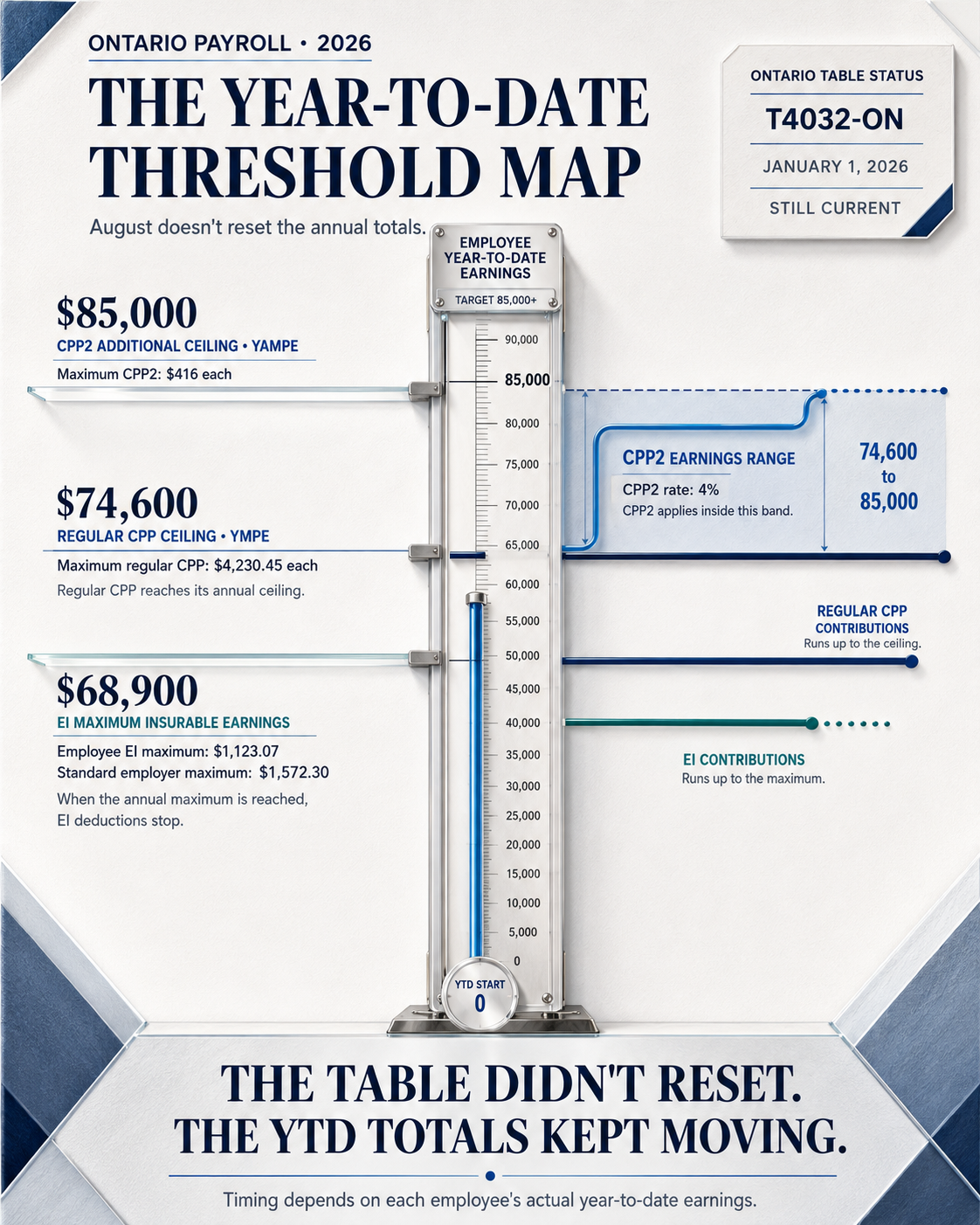
For 2026, maximum insurable earnings increased from $65,700 to $68,900, a rise of $3,200.
The employee EI rate outside Quebec decreased slightly from 1.64% in 2025 to 1.63% in 2026. However, the higher earnings ceiling increased the maximum annual employee premium from $1,077.48 to $1,123.07.
The standard maximum employer premium is $1,572.30.
Once an employee reaches the annual maximum for that employment, EI deductions should stop. If EI suddenly disappears from an August paycheque, check year-to-date insurable earnings before treating it as an error.
Review the current figures on the CRA EI premium rates and maximums page.
The employee crossed the regular CPP ceiling
The 2026 Year’s Maximum Pensionable Earnings increased from $71,300 to $74,600, a rise of $3,300.
The employee and employer contribution rate remains 5.95%. The maximum regular CPP contribution increased from $4,034.10 in 2025 to $4,230.45 in 2026.
Check the current amounts on the CRA CPP contribution rates and maximums page.
The employee entered the CPP2 earnings range
CPP2 applies to pensionable earnings above the first ceiling and up to the additional annual ceiling.
For 2026:
| CPP2 item | 2025 | 2026 | Change |
| First earnings ceiling | $71,300 | $74,600 | $3,300 |
| Additional earnings ceiling | $81,200 | $85,000 | $3,800 |
| Employee CPP2 rate | 4% | 4% | No change |
| Maximum employee CPP2 | $396 | $416 | $20 |
| Maximum employer CPP2 | $396 | $416 | $20 |
An employee may finish regular CPP during late summer and then start CPP2. That transition can make the deduction line look different even though the employee’s salary has not changed.
The CRA CPP2 rates and maximums confirm the $85,000 additional ceiling and $416 maximum contribution for 2026.
The employee received a bonus or irregular payment
Summer bonuses, commissions, retroactive pay, accumulated overtime and vacation pay can change tax withholding for a single pay period.
Payroll software may annualize or calculate irregular payments differently from ordinary salary. A larger tax deduction on one payment does not necessarily mean the employee will owe that same rate on every future paycheque.
The employee submitted new TD1 information
An employee may request additional withholding or provide updated personal tax-credit information.
Review the latest federal TD1 and Ontario TD1ON forms on file. Do not change a claim code based on a verbal request alone when written information is required.
The CRA explains when employers should obtain or update employee forms in its TD1 employer guidance.
The employee’s province of employment changed
Payroll deductions normally follow the employee’s province of employment, which may differ from the employee’s home address.
This becomes important when an employee:
- Moves between provinces
- Works remotely
- Reports to a different establishment
- Transfers to another office
- Receives pay from another business location
Use the CRA’s province-of-employment guidance before changing the tax table.
Fresh 2026 Payroll Figures Ontario Employers Should Confirm
The table below brings the main annual figures into one place.
| Payroll item | 2026 figure | What to check in August |
| Lowest federal income-tax rate | 14% | Confirm the current federal table |
| Lowest Ontario income-tax rate | 5.05% | Keep the January 2026 Ontario setting |
| CPP maximum pensionable earnings | $74,600 | Identify employees approaching the ceiling |
| CPP basic exemption | $3,500 | Confirm the exemption matches pay frequency |
| Maximum regular CPP contribution | $4,230.45 each | Check employee and employer year-to-date totals |
| CPP2 additional ceiling | $85,000 | Identify employees who have entered the CPP2 range |
| Maximum CPP2 contribution | $416 each | Check employee and employer portions |
| EI maximum insurable earnings | $68,900 | Identify employees approaching the EI maximum |
| EI employee rate outside Quebec | 1.63% | Confirm the payroll rate |
| Maximum employee EI premium | $1,123.07 | Stop only when the annual maximum is reached |
| Maximum standard employer EI premium | $1,572.30 | Reconcile the employer expense and liability |
These are annual 2026 figures. They did not begin again in August.
Your payroll system should carry the employee’s year-to-date amounts forward from the first payroll of the calendar year.
August and September 2026 Payroll Remittance Calendar
The payroll calculation is only half the job. The employer must also send employee deductions and employer contributions to the correct CRA payroll account by the applicable deadline.
Your exact deadline depends on your CRA remitter type.
Regular remitters
Regular remitters generally send deductions by the 15th day of the month following the month in which employees were paid.
| Payroll deductions taken in | Standard due date | Adjusted 2026 due date |
| July 2026 | August 15 | Monday, August 17, 2026 |
| August 2026 | September 15 | Tuesday, September 15, 2026 |
| September 2026 | October 15 | Thursday, October 15, 2026 |
August 15 falls on a Saturday. The CRA treats a payment as on time when it receives or processes it by the next business day after a weekend or recognized public holiday.
Accelerated remitters, threshold 1
Threshold 1 remitters generally send deductions twice each month.
| Employee payment period | Remittance due date |
| August 1 to August 15 | August 25, 2026 |
| August 16 to August 31 | September 10, 2026 |
| September 1 to September 15 | September 25, 2026 |
| September 16 to September 30 | October 13, 2026 |
The final date moves to October 13 because October 10 falls on a Saturday and October 12 is Thanksgiving Day, a public holiday recognized by the CRA.
Quarterly remitters
Eligible quarterly remitters send deductions from July through September by October 15, 2026.
Accelerated remitters, threshold 2
Threshold 2 remitters generally send deductions within three working days after the applicable weekly remitting period.
These employers should not rely on a monthly reminder. Review every payment cycle against the business’s CRA remitter classification and calendar.
The CRA Employers’ Guide explains remitter types and thresholds. The CRA also provides current payroll remittance due-date guidance.
A Practical Ontario Example
Consider an Ontario employee earning $120,000 per year and receiving 26 biweekly payments.
Each regular gross payment is approximately:
$120,000 ÷ 26 = $4,615.38
After 16 payments, the employee has received approximately:
$4,615.38 × 16 = $73,846.08
That amount remains just below the 2026 CPP earnings ceiling of $74,600.
After the 17th payment, cumulative gross pensionable pay reaches approximately:
$73,846.08 + $4,615.38 = $78,461.46
The employee has now moved above the regular CPP ceiling and into the CPP2 earnings range.
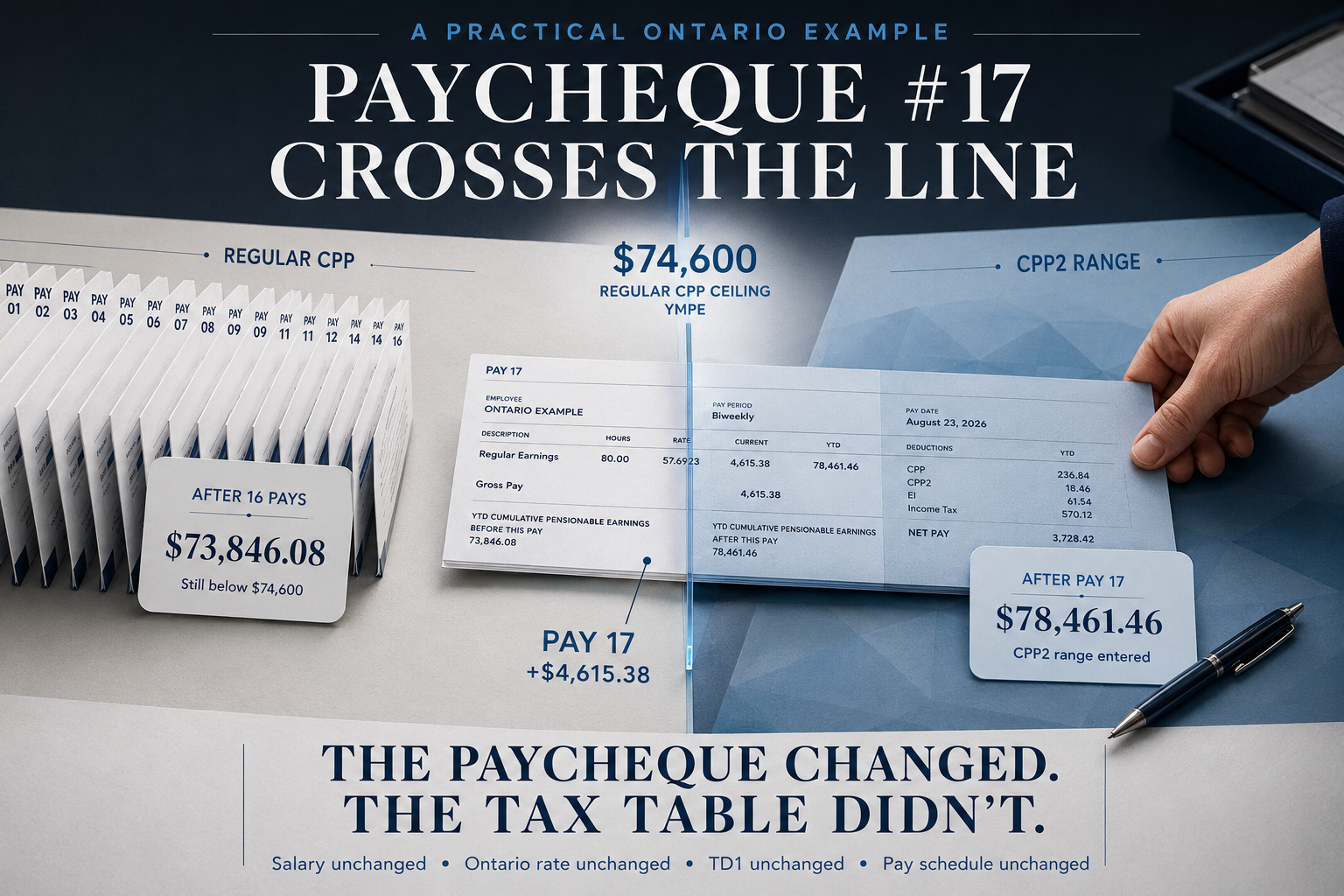
Their August paycheque may show a different CPP pattern even though:
- Their salary did not change
- Ontario’s tax rate did not change
- Their TD1 claim did not change
- The payroll schedule did not change
This is the type of situation where a vague “taxes changed” explanation is not good enough.
The employer should check:
- Year-to-date pensionable earnings
- Year-to-date regular CPP
- The point at which regular CPP stopped
- The amount of CPP2 calculated
- The employer’s matching CPP and CPP2
- The resulting payroll liability posted to the books
Use the CRA Payroll Deductions Online Calculator to test an employee’s deduction when the result needs a second check.
Which CRA Tool Should You Use?
| CRA resource | Best use | Practical example |
| T4032-ON tables | Standard Ontario payroll deductions | Weekly, biweekly, semi-monthly or monthly payroll |
| Payroll Deductions Online Calculator | Exact payroll spot checks | Bonus, disputed deduction or employee near an annual ceiling |
| T4008 Supplementary Tables | Unusual pay periods | Daily or uncommon annual payroll frequencies |
| T4127 Payroll Formulas | Payroll system calculations | In-house payroll systems or software-provider review |
| T4001 Employers’ Guide | Deducting, remitting and reporting rules | Employer responsibilities and remitter classification |
Be careful with third-party calculators.
A page may have “2026” in the title while using estimated brackets, simplified formulas or prior-year claim amounts. Use third-party tools for planning only unless they clearly state that they follow the current CRA formulas.
Use PDOC when you need an official comparison for an actual paycheque.
What Should You Check Before September Payroll?
Use this checklist before August closes.
Payroll software
- Current payroll version installed
- CRA July 2026 release supported
- Ontario still linked to the January 2026 table
- No unexplained changes to claim-code settings
- No annual balances reset during the update
Employee records
- Correct province of employment
- Current federal TD1
- Current Ontario TD1ON
- Additional withholding requests recorded
- New hires entered correctly
- Terminated employees removed from future payroll
- Bonuses and taxable benefits identified
Annual deduction balances
- Pensionable earnings
- Regular CPP
- CPP2
- Insurable earnings
- EI premiums
- Federal and Ontario income tax
- Employer CPP and CPP2
- Employer EI
Accounting records
- Gross wages posted as an expense
- Employee deductions posted as liabilities
- Employer contributions posted as expenses and liabilities
- Payroll clearing account reviewed
- CRA payroll liability reconciled
- Bank payment matched to the correct payroll account
CRA records
- Remitter type confirmed
- August and September deadlines added to the calendar
- PD7A statement reviewed
- Prior payments correctly allocated
- Payment confirmation saved
- Any discrepancy investigated before the next remittance
Common August Payroll Mistakes
Looking for an Ontario August tax table that does not exist
As of August 6, 2026, Ontario’s current table remains the January edition.
Do this: Confirm Ontario on the CRA’s current T4032 index.
Not this: Download another province’s July table because it has the newest date.
Restarting CPP and EI after a software update
CPP, CPP2 and EI work on calendar-year totals. They do not restart in July, August or September.
A reset can cause excess employee deductions, excess employer costs and year-end T4 differences.
Stopping deductions too early
Do not stop CPP or EI because an employee’s annual salary exceeds a ceiling.
Check actual year-to-date pensionable or insurable earnings and contributions for that employment.
Missing the August 17 remittance date
A regular remitter’s July payroll payment would ordinarily fall on August 15. In 2026, that date is a Saturday, so the deadline moves to Monday, August 17.
Do not assume the payment processed merely because someone created it in online banking. Check the processing date and payroll account.
Updating net pay without correcting the payroll records
A manual e-transfer or direct-deposit adjustment does not correct:
- Year-to-date deductions
- Employer contributions
- Payroll liability accounts
- CRA remittances
- Future T4 reporting
Correct the payroll record first, then correct the payment.
Mixing CRA source deductions with Ontario Employer Health Tax
Ontario Employer Health Tax is separate from CPP, EI and income-tax deductions.
EHT is an employer payroll tax based on Ontario remuneration. It does not come off an employee’s paycheque and does not appear in the CRA’s T4032 tables.
Review Ontario’s Employer Health Tax guidance separately.
What Should You Do Next?
Follow this order:
- Confirm the current Ontario T4032 table.
- Review your payroll provider’s latest release notes.
- Compare July closing balances with August opening balances.
- Identify employees approaching CPP, CPP2 or EI limits.
- Review bonuses, vacation payments and taxable benefits.
- Confirm employee province-of-employment records.
- Test selected employees through CRA PDOC.
- Reconcile payroll liabilities to the general ledger.
- Confirm your August and September remittance dates.
- Save the review and approval records.
You do not need to recalculate every employee manually.
Choose employees with the highest likelihood of a difference:
- High-income employees
- Employees receiving bonuses
- Employees with changed TD1 information
- Remote employees
- Employees close to annual CPP or EI maximums
- Employees whose net pay changed unexpectedly
When Should an Ontario Employer Get Professional Help?
A payroll difference becomes more than a routine software question when it affects several records.
Consider professional support when:
- Payroll and CRA PDOC produce materially different results
- Year-to-date CPP, CPP2 or EI totals restarted
- An employee was assigned to the wrong province
- Payroll liability accounts do not clear
- A CRA payment went to the wrong payroll account
- Employer CPP or EI was not recorded
- Bonuses or taxable benefits were handled inconsistently
- A previous payroll period needs correction
- The company has employees in several provinces
- T4 totals no longer match the payroll register
TaxRecon’s payroll and CRA source-deduction service can review the calculation, employer contributions, remittance and payroll-account balance together.
When the difference also appears in the general ledger, TaxRecon’s bookkeeping and financial management support can help trace where the payroll entry stopped matching the underlying records.
For broader CRA issues, visit TaxRecon’s CRA compliance service.
The aim is not to force a new Ontario rate into the system. It is to identify what caused the difference and bring the employee record, payroll report, bookkeeping and CRA account back into agreement.
Final Thoughts
Ontario employers do not need a new provincial payroll table for August or September 2026.
The current 2026 payroll deductions tables Ontario employers should use remain the T4032-ON tables effective January 1, 2026. The CRA’s July formulas are now active, but Ontario did not receive a mid-year provincial rate change.
August still deserves attention.
By late summer, more employees may approach the EI maximum, reach the regular CPP ceiling or enter the CPP2 range. Remittance dates can also shift because of weekends and public holidays.
Do not begin with the assumption that “the tax rate changed.”
Start with the employee’s year-to-date record. Then check the payroll calculation, employer contribution, accounting entry and CRA payment.
That process usually reveals what actually changed.
Need Help Reviewing August Payroll Before September?
Your payroll records do not have to be perfectly organized before you ask for help.
Bring the payroll register, employee year-to-date report, software version, TD1 records, payroll-liability balances and latest CRA statement. TaxRecon can help identify which figures agree, which figures need attention and what practical step should come next.

Contact TaxRecon to request a payroll review.
Frequently Asked Questions
Did Ontario payroll deductions change in August 2026?
No new Ontario provincial payroll table has been listed for August 2026. Ontario employers should continue using the T4032-ON tables effective January 1, 2026. A paycheque may still change because of CPP, CPP2, EI, bonuses, taxable benefits or updated employee information.
Will Ontario receive new payroll deduction tables in September 2026?
As of August 6, 2026, the CRA’s current T4032 index does not list a separate September Ontario table. Employers should monitor official CRA notices and payroll-provider updates rather than assuming a monthly table will be issued.
When is a regular remitter’s July 2026 payroll payment due?
The payment is due Monday, August 17, 2026. The normal August 15 deadline falls on a Saturday, so the CRA’s next-business-day rule applies.
Why did CPP change on an employee’s August paycheque?
The employee may have reached the $74,600 regular CPP earnings ceiling or entered the CPP2 range between $74,600 and $85,000. Review year-to-date pensionable earnings and contributions before changing the payroll setup.
Do employees need new TD1 and TD1ON forms in September?
Not simply because September begins. Employees generally provide new forms when they start employment or when their personal tax-credit or withholding information changes. Keep the most recent valid forms with the payroll records.
What should an employer do when payroll software disagrees with CRA PDOC?
First compare the pay date, gross pensionable and insurable earnings, pay frequency, province of employment, TD1 claim code and year-to-date balances. If the difference remains, stop before changing employee pay and review the software setup or calculation with a payroll professional.