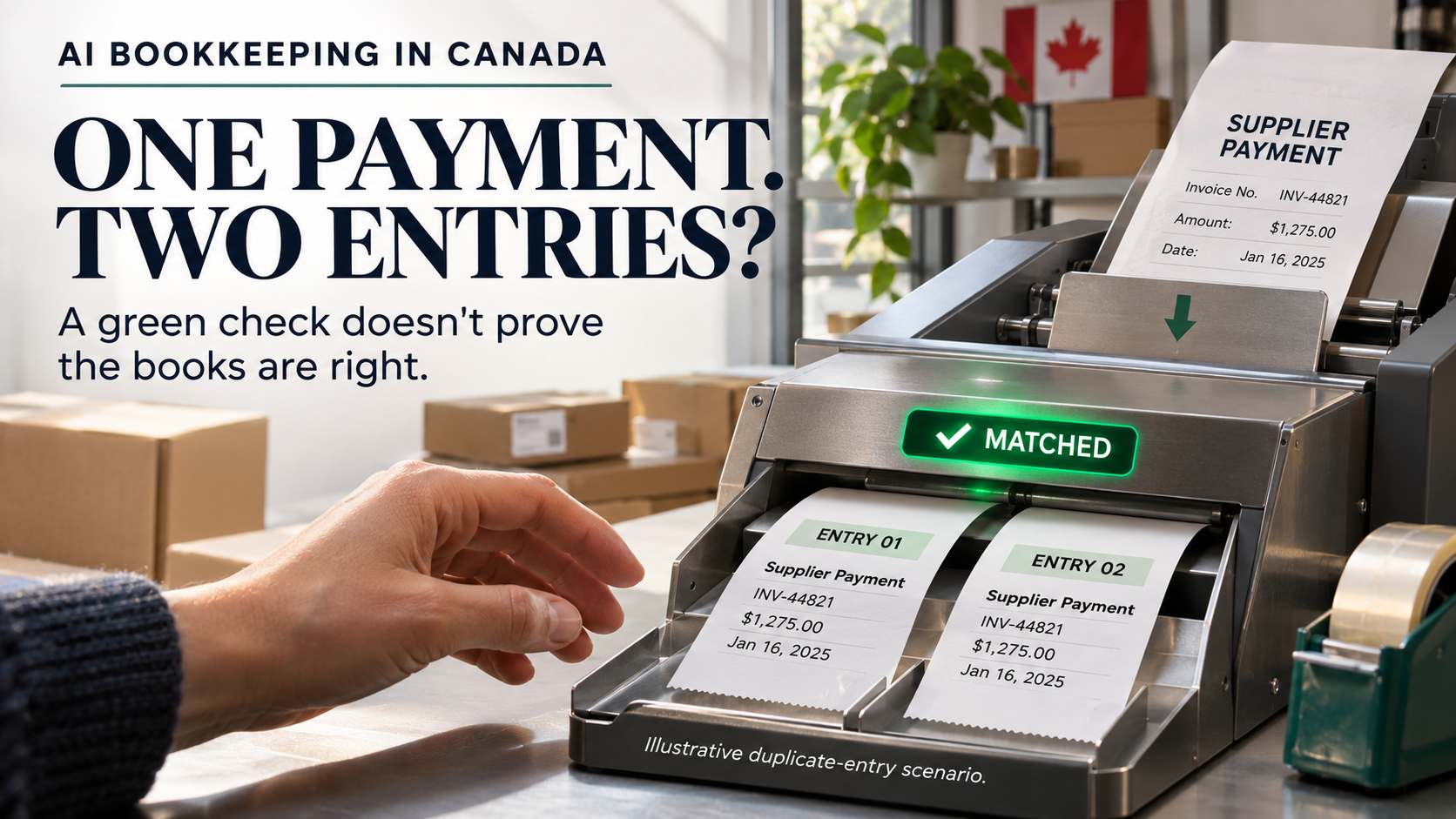
The numbers look tidy. The bank feed is connected. Receipts are being scanned, expenses get labelled on their own, and a dashboard says the books are up to date. Then a supplier asks about a payment that the software recorded twice.
So much for the “set it and forget it” dream.
AI bookkeeping in Canada is worth exploring, especially for owners who would rather run their businesses than chase receipts. But a suggested transaction category is not the same as a verified accounting entry. A polished report can still contain the wrong sales tax, missing fees or payments matched to the wrong customer.
That distinction shapes how TaxRecon approaches the conversation: technology can handle repetitive work, but reliable books still depend on evidence, reconciliation and someone who understands what the numbers mean.
Key Takeaways
- AI can help capture receipts, suggest expense categories, match transactions and flag unusual activity.
- GST/HST decisions, uncertain matches, owner transactions and final reporting need accountable human review.
- A bank feed that updates automatically does not prove the accounts are reconciled.
- Test a narrow workflow against real source documents before expanding automation.
Can AI Actually Do Your Bookkeeping in Canada?
AI can complete parts of the bookkeeping process, but it cannot independently guarantee accurate books or Canadian tax compliance. Well-configured tools can read invoices, suggest transaction categories and identify possible matches. A bookkeeper or business owner still needs to verify exceptions, reconcile accounts and approve decisions that depend on business context.
The appeal is understandable. Statistics Canada’s second-quarter 2026 survey of business AI use found that 19.2% of Canadian businesses had used AI to produce goods or deliver services during the preceding year. That figure covers business AI use broadly, not AI bookkeeping adoption specifically. It shows a growing appetite for AI, not evidence that accounting can safely run unattended.
It also helps to separate three things that software marketing often blends together:
- Rules-based automation follows instructions, such as categorizing every payment to a particular supplier as office supplies. It is not necessarily AI.
- Machine learning (ML) identifies patterns from data and may suggest classifications or matches.
- Generative AI produces text, explanations and other outputs that can sound certain even when underlying details are missing.
They can all save time. None can replace a receipt that was never supplied or a judgment that depends on a contract, ownership structure or tax rule.
What Bookkeeping Tasks Are Worth Automating?
Start with repetitive work where another document can confirm the result. This is where AI bookkeeping software and ordinary automation tools can make the working day lighter without turning the general ledger into a guessing contest.
Receipt and Invoice Capture
AI receipt scanning software can extract dates, supplier names, amounts and tax shown on a document. AI invoice processing may also suggest vendors or connect a document to an existing transaction.
The catch is simple: optical character recognition can misread a faded total, and two similar invoices can be mistaken for duplicates. Check the original document and preserve it in the record.
Transaction Suggestions and Bank Matching
Automated expense categorization can propose where familiar purchases belong. Automated bank reconciliation tools can flag likely matches between downloaded bank activity and accounting entries.
But a suggested match is not a completed reconciliation. A bank payment could settle several invoices, repay a loan or transfer money between business accounts. Similar amounts do not settle the question.
Exception Alerts and Reporting Drafts
Software may flag unusual spending, missing receipts or an unexpected balance. It can also help prepare management report drafts once the underlying books have been reviewed.
That is a useful role for automated financial reporting: drawing attention to a question, not quietly declaring an unverified answer correct.
Which Accounting Decisions Should Never Run on Autopilot?
| Task | Sensible Automation Role | Human Checkpoint |
| Receipt capture | Extract details and attach the file | Compare against the receipt and business purpose |
| Recurring expenses | Suggest category and tax code | Review exceptions and changes in treatment |
| Bank-feed matching | Propose transaction matches | Verify against statements, invoices and clearing accounts |
| E-commerce payouts | Import sales, refunds and fees | Reconcile gross activity to net deposits |
| GST/HST tracking | Calculate from configured rules | Confirm place-of-supply, tax codes and ITC eligibility |
| Payroll posting | Import approved payroll summaries | Check deductions, liabilities and correct periods |
| Owner loans or equipment | Flag transactions for review | Decide accounting and tax treatment before posting |
| Year-end reporting | Draft reports and identify anomalies | Reconcile balances and approve final figures |
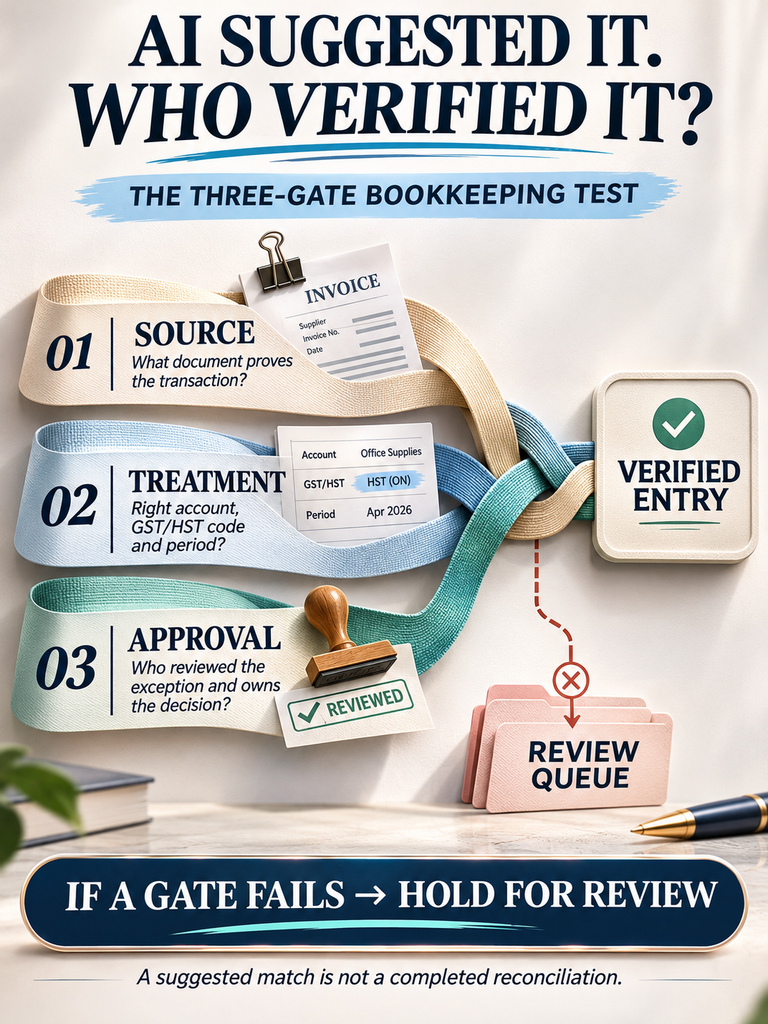
Think of this as the Three-Gate Test. Before any automated entry becomes final, it should pass three questions:
- Source: What invoice, receipt, statement or contract proves it happened?
- Treatment: Is the account, GST/HST code and reporting period right for this business?
- Approval: Who checks exceptions and owns the decision?
If a transaction fails a gate, place it in a review queue. Do not make a confident guess look like settled accounting.
Real-World Scenario: The Ontario Store Whose Deposit Looked Like Revenue
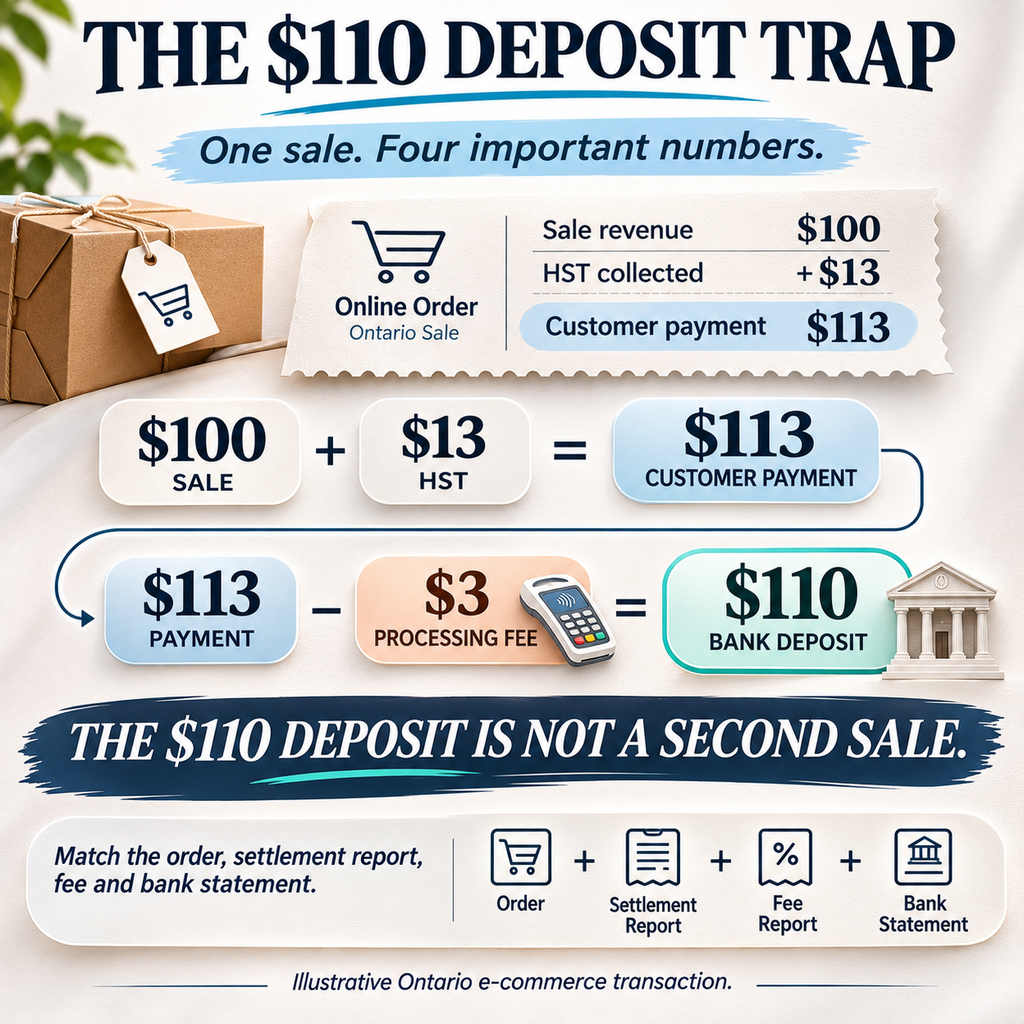
Consider an illustrative Ontario online store selling an item for $100 plus $13 HST. A payment processor collects $113, deducts a $3 processing fee and sends $110 to the bank.
Those figures tell different stories. The sale is $100, the HST collected is $13, the fee is $3, and the net bank deposit is $110. The correct entries depend on the platform’s reports and the actual transaction details.
Now imagine the accounting software imports the $113 sales record and separately labels the $110 bank deposit as new sales. The dashboard may show money twice. Another system might call the $110 deposit revenue and miss the processing fee or tax liability.
Neither error is obvious just because the transaction has a green checkmark.
This is financial transaction matching, not merely categorization. It requires a comparison among the store order, payment-processor settlement, fee report and bank statement. The same principle applies when refunds, chargebacks or multiple orders share a payout.
Real-World Case Study: What Researchers Found in Working Accounting Systems
In a 2026 study published in the Journal of Accounting Research, researchers Jung Ho Choi and Chloe L. Xie examined real transaction-level activity from an AI-supported accounting platform serving small and medium-sized businesses in the United States. The work also included accountant surveys and a controlled classification experiment.
Their findings were more interesting than the idea that AI simply replaces data entry. Routine accounting activity became less central to human work, while quality checks and communication grew in importance. Accountants stepped in when the system signalled low confidence. In the experiment, AI support improved classification overall, yet following recommendations that conflicted with other evidence could increase errors.
This was research involving US businesses, not a documented TaxRecon client or a Canadian tax-compliance test. Still, it offers a practical lesson for Canadian owners: using AI effectively requires a review process that catches exceptions before they become financial reports.
Read the published study abstract and journal citation.
What Are the Biggest AI Bookkeeping Risks for Canadian Businesses?
Wrong GST/HST Codes Can Quietly Spread
A rule trained on yesterday’s transactions may repeat the wrong tax treatment across many entries. A supplier receipt may have no recoverable GST/HST. A sale may involve a different province, an exempt service or a zero-rated supply. The software needs a properly configured starting point, supported documents and review when circumstances change.
Duplicate Entries Can Make Reports Look Convincing
A payment might arrive through both an integration and a bank feed. If the system records both as new activity, sales or expenses can be overstated. Automatic imports are helpful; automatic acceptance is not.
Private Information Can Travel Farther Than Expected
An invoice can contain customer names, addresses, payment details and other sensitive information. Before uploading it to an AI tool, check the provider’s data-use terms, retention settings, access controls, subcontractors and where information is processed.
Canada’s privacy obligations depend on the business and jurisdiction. The federal Personal Information Protection and Electronic Documents Act (PIPEDA) may apply to commercial activities, while provincial privacy laws can also be relevant.
The Office of the Privacy Commissioner of Canada’s guidance on responsible generative AI states that “accountability for decisions rests with the organization”. A software subscription does not transfer responsibility for how personal information is handled or how consequential decisions are made.
A Polished Answer Can Hide Missing Evidence
Generative AI can write a persuasive explanation for an expense category even if it has never seen the supplier’s invoice. Treat that explanation as a suggestion to investigate, not proof.
What Most Business Owners Get Wrong: Do This, Not That
Do this: Let automation draft classifications, then review exceptions against original records.
Not that: Approve every suggestion because the system reports a high confidence score.
Do this: Reconcile bank and card accounts to actual statements, including payment-processor clearing balances.
Not that: Assume a bank connection means the month is closed.
Do this: Check whether a tax code is correct for the transaction and reporting period.
Not that: Allow last year’s GST/HST setting to decide every new sale or purchase.
Do this: Limit staff permissions and review vendor privacy terms before sending documents into an AI service.
Not that: Paste customer invoices or payroll details into an unapproved public chatbot.
For businesses weighing platforms, TaxRecon’s QuickBooks vs Xero in Canada comparison addresses software setup, Canadian tax handling and the limits of automatic bank feeds. If errors have already spread through prior periods, its guide to bookkeeping cleanup explains how records can be checked against external evidence.
How Should a Canadian Small Business Test AI Bookkeeping?
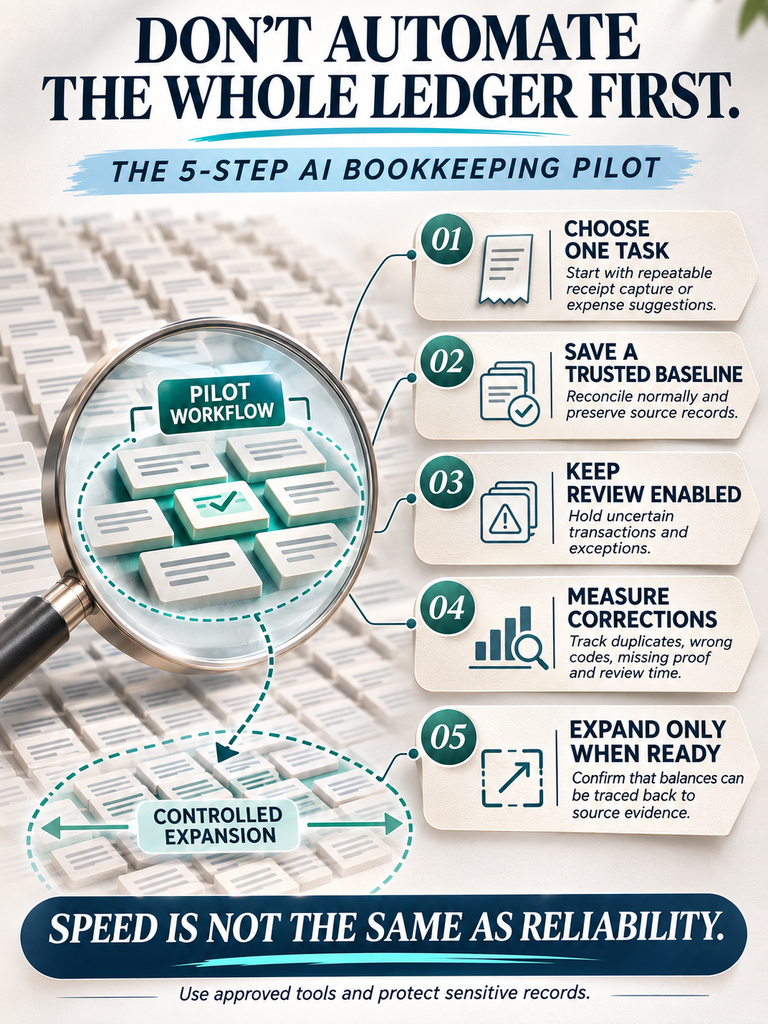
The smart starting point is a limited pilot, not a company-wide switch.
- Choose one repeatable process. Start with receipt capture or categorization of a small set of familiar expenses. Avoid payroll filings or tax treatment decisions as the first experiment.
- Agree on a trusted baseline. Complete a normal reconciliation and save the source records before changing rules or connecting new apps.
- Run the tool with review enabled. Keep an approval queue for uncertain entries, exceptions, unusual suppliers and tax codes.
- Measure what required correction. Record duplicate imports, wrong categories, missing attachments and time spent reviewing, not just time saved entering data.
- Expand only after the evidence holds up. Add another workflow when the source documents, reconciliations and review responsibility remain clear.
One Test Worth Keeping
Can a reviewer trace a selected report balance all the way back to the statement, invoice or other source document? If not, speed has arrived before reliability.
AI vs Human Bookkeeper: Which Makes Better Financial Sense?
This is not a contest between people and software. It is a question of assigning work to the right place.
AI can reduce repetitive entry, bring documents into one workflow and point to transactions worth checking. A human bookkeeper can ask why a transfer occurred, whether an owner purchase belongs in the business, whether a balance makes sense and which issues need professional accounting or tax advice.
That is also why QuickBooks AI bookkeeping and other accounting automation features should be evaluated through the quality of the books they produce, rather than the number of clicks they remove. A low subscription cost is not a saving if somebody must later rebuild unreliable accounts.
TaxRecon’s cloud accounting services cover software configuration, integrations and financial workflow improvement. Its separate bookkeeping services cover transaction recording, reconciliation and ongoing record review. Keeping those responsibilities clear is useful when deciding who maintains an automated system and who checks the results.
Final Thoughts: Let AI Do the Repeating, Not the Deciding
The promise of AI bookkeeping in Canada is real, but it is narrower than the sales pitch sometimes suggests. Software can move information quickly. It cannot know the whole story behind a transaction without reliable inputs and appropriate checks.
For a growing business, the best outcome is not a dashboard that says everything is finished. It is a set of books that can be explained, reconciled and used without second-guessing the data.
Start with one safe task, keep a human review point, and let the evidence decide what deserves automation next.
Ready to Make Your Accounting Tools Work Better?
If your software saves time but leaves you unsure about the numbers, the next move is a workflow review rather than another app subscription. TaxRecon can help you assess how transactions move into your books, where checking is needed and whether your setup fits the business. Start a conversation about the specific process that is causing trouble.
Frequently Asked Questions
Is AI Bookkeeping Legal in Canada?
Using AI for bookkeeping is not prohibited simply because a tool uses AI. A business still needs to meet applicable tax, recordkeeping and privacy obligations. Check how the software handles personal information, what evidence it keeps and whether staff can review and correct entries before relying on the results.
Can AI Replace a Small-Business Bookkeeper?
AI can take over repetitive tasks, but it does not reliably replace the context and judgment needed for all bookkeeping decisions. Unusual transactions, account reconciliations, tax-code questions and month-end checks still need oversight. The better question is which tasks a person can review more efficiently with software assistance.
What Is the Best AI Accounting Software in Canada?
The best fit depends on the accounting file, volume of transactions, Canadian tax requirements, other connected applications and who will review the output. Compare actual workflows, not just feature lists. Test receipts, payout reconciliation, bank matches and reporting with sample records before committing to a platform.
Is Automated Bank Reconciliation Accurate Enough to Trust?
Automated matching can save work, but bank reconciliation is complete only when records agree with statements and discrepancies are explained. Similar amounts can belong to different invoices, transfers or expenses. Review outstanding items and any clearing account rather than assuming that every proposed match is correct.
Can AI Calculate GST/HST Correctly?
AI-assisted software can apply configured tax codes and prepare figures for review. It cannot independently establish every transaction’s tax treatment. The right answer may depend on the type of supply, location, exemptions and supporting invoices. Businesses should review the settings and relevant records before using figures in a return.
Does AI Bookkeeping Put Customer Information at Risk?
It can if a business sends sensitive data to tools without suitable safeguards. Review access permissions, provider agreements, data retention, processing locations and whether information can be used to train models. Applicable Canadian privacy requirements should guide how documents and personal information are handled.
Can TaxRecon Help Set Up Automated Bookkeeping Workflows?
TaxRecon offers cloud accounting setup, integration planning and workflow improvement for systems such as QuickBooks Online and Xero. The appropriate work depends on the existing file, connected tools and what the business wants to change. Configuration and ongoing bookkeeping responsibilities should be agreed on separately.
What if My Accounting Software Has Already Categorized Transactions Incorrectly?
Stop the rule or workflow causing the problem, preserve the source records and identify the affected period. Review classifications, duplicates, tax codes and reconciliations before changing historical reports. TaxRecon provides bookkeeping support and cleanup work, which can help address errors within an agreed engagement scope.